

Reminder
Overview
Create reminders to send scheduled messages to individual contacts.
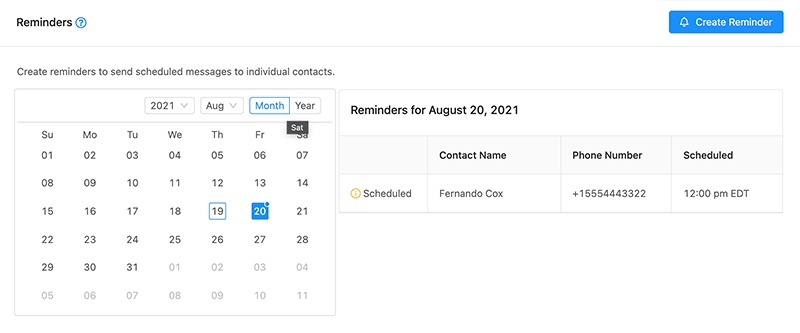
Tip: Dates that have messages scheduled have a blue dot identifier above the day number.
Creating a Reminder
Choose the date on the calendar for which you would like to schedule the reminder.
Click "Create Reminder"
Select a contact as a recipient.
Select a timezone and time at which to send the message.
Enter your message.
Click "Save"
Editing a Reminder
Choose the date on the calendar for which the reminder is scheduled for. This will pull up a list of reminders for that date on the right hand side.
Click the reminder that you would like to edit.
Edit the desired fields.
Click "Update"
Note Reminders can be edited or deleted up until their scheduled date / time.
Deleting a Reminder
Choose the date on the calendar for which the reminder is scheduled for. This will pull up a list of reminders for that date on the right hand side.
Click the reminder that you would like to edit.
Click the "Delete" button to open the confirmation prompt.
Click "OK" to confirm deletion.
Last updated